Let's Connect

Our team is here for you!

✉️ Sign up to receive exclusive offers and important updates

OR

Reach out to us directly

Licensing

Choose the license that fits your release

MP3 License

Non-exclusive

  • MP3 File
  • WAV File
  • Track Stems File
  • License Agreement
  • Instant Download
  • Upload To All Streaming Platforms
  • Unlimited Audio Streams
  • 1 Music Video
  • Radio Broadcasting
Why choose this i
Best if you:
  • Are just starting out
  • Are testing your sound or idea
  • Want the cheapest way to release
Things to consider:
  • Lower audio quality
  • Limited flexibility
  • Stream numbers are capped
Bottom line:
Great for testing ideas. Most artists upgrade once they take music more seriously.

WAV License

Non-exclusive

  • MP3 File
  • WAV File
  • Track Stems File
  • License Agreement
  • Instant Download
  • Upload To All Streaming Platforms
  • Unlimited Audio Streams
  • 1 Music Video
  • Radio Broadcasting
Why choose this i
Best if you:
  • Want better sound quality
  • Release on Spotify and Apple Music
  • Perform live
Things to consider:
  • No track stems for full mix controls
  • Stream numbers are still limited
Bottom line:
A solid upgrade from MP3, but higher tiers make more sense for full freedom or no stream limits.

Track Stems

Non-exclusive

  • MP3 File
  • WAV File
  • Track Stems File
  • License Agreement
  • Instant Download
  • Upload To All Streaming Platforms
  • Unlimited Audio Streams
  • 2 Music Videos
  • Radio Broadcasting
Why choose this i
Best if you:
  • Want professional-level mix and mastering
  • Work with an engineer
  • Need full control over the sound
Things to consider:
  • Stream numbers are still limited
Bottom line:
Perfect for high-quality production, but not ideal if you want unlimited reach.

Full Monetization

Non-exclusive

  • MP3 File
  • WAV File
  • Track Stems File
  • License Agreement
  • Instant Download
  • Upload To All Streaming Platforms
  • Unlimited Audio Streams
  • Unlimited Music Videos
  • Radio Broadcasting
Why choose this i
Best if you:
  • Believe in your music 100%
  • Monetize heavily with videos, ads, radio, and content
  • Want maximum freedom and control
Things to consider:
  • Can be overkill if you are still experimenting casually
Bottom line:
The highest level lease license available. More expensive, but worth it if you are going all in.

Upgrade your license anytime - just pay the difference.

FAQs & Help

Find the answers you need

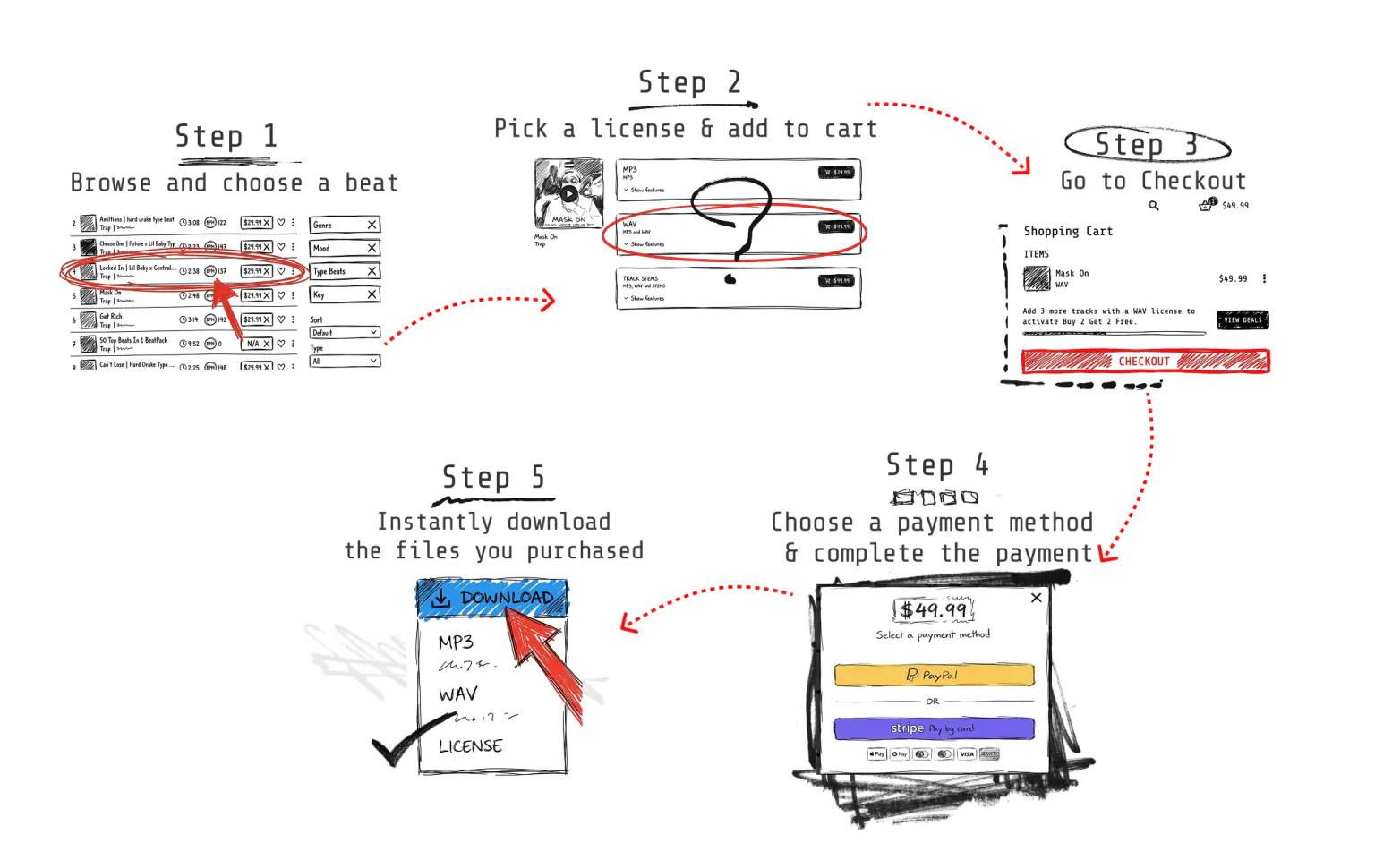
How to buy (A step-by-step guide)

Beat Leasing Explained

Licenses & Usage Rights

YouTube, Content ID & Claims

Uploading & Distribution

Downloads & Files

Credits, Royalties & Publishing

Payments, Refunds & Policies

Order Help & Troubleshooting

Search results

How to buy (A step-by-step guide)

Additional tips:

Beat Leasing Explained

Beat leasing means you’re buying a license (permission) to use a beat for your song under specific terms. You’re not buying full ownership of the beat - you’re buying legal rights to use it for releases based on what the license allows.

A lease / non-exclusive license allows you to use the beat, but other artists can license the same beat too. Exclusive rights / an exclusive license means you’re the only new license holder going forward, and the beat is being removed from the beat store.

No. A lease/license gives you usage rights, not full ownership of the beat’s copyright. You do own your song recording (your vocals and final track), but the producer still owns the underlying beat.

Yes. That’s normal with leasing. If you want to be the only artist using the beat going forward, you’ll need exclusive rights/exclusive license.

Yes! your song is protected as long as you purchased a valid license. Multiple artists can legally release different songs on the same beat.

Your existing license remains valid. Exclusive rights affect future sales, not licenses that were already sold. Your song stays covered under the terms you purchased.

It means you have permission to use the beat, but you’re not the only person who can license it.

After checkout, you’ll be taken to a receipt page where you can download:
• your beat files (based on what you purchased)
• a PDF license agreement
You’ll also receive an email that redirects you back to that receipt page for downloads.

The license agreement is the document that explains your rights and rules. It’s important because it’s your official proof of permission if you ever need to show ownership/usage rights to a platform, distributor, or during a claim dispute.

You have:
• your receipt/order confirmation
• the PDF license agreement available on the receipt page
Keep both. If any issue comes up later, this is what you’ll use to prove you’re licensed.

Track stems (trackouts) are the beat split into separate tracks (kick, snare, bass, melody, etc.). They give you more control for mixing vocals properly, improving sound quality, and making clean edits.

Not always. Stems are most useful if you want the best mix control, you’re working with an engineer, or you want to tweak the beat balance.

Yes. You can typically cut, rearrange, and edit the beat to fit your song. You can’t resell the beat itself or claim you created the original instrumental.

Yes. Adding instruments, effects, and creative changes is normal. Your edits don’t remove the producer’s ownership of the original beat - you’re still using it under a license.

The preview version of a beat may have multiple tags for protection. After purchase, those repeated tags are removed. Depending on the beat, one short producer tag may still remain at the beginning, which is common in the industry.

Yes. Beat leasing is a standard model used worldwide. The key is buying the correct license for your plans and keeping your receipt + license agreement as proof.

Licenses & Usage Rights

If you buy a license, you can record your song, release it, promote it, and monetize it. That includes earning money from streaming platforms, sales, YouTube monetization, and social content - using the beat as part of your own original song.

Yes. If you buy a license, you can release your song on streaming platforms like Spotify and Apple Music.

Yes. If you buy a license, you can upload your song to YouTube (audio upload, visualizer, lyric video, or music video).

Yes. If you buy a license, YouTube monetization is allowed.

Yes. If you buy a license, you can use your song on TikTok, Instagram Reels, and similar short-form platforms.

Yes. If you buy a license, you can release the same song across multiple platforms (streaming + social + video). That’s normal and expected.

Yes. If you buy a license, you can distribute your song through services like DistroKid, TuneCore, CD Baby, and others.

Streaming platforms (Spotify/Apple Music) are where listeners stream your released song.
Content ID systems (like YouTube Content ID) automatically detect audio in videos and can place claims/monetize content. They are separate systems - releasing to streaming does not mean you should register Content ID.

No. Content ID registration is not allowed unless you have exclusive rights.
If you register a leased beat in Content ID, it can cause serious problems, like false claims on your own uploads, other creators’ uploads, blocked monetization, takedowns, or long claim disputes. If you want Content ID control, you need exclusive rights.

Yes. If you buy a license, you can use the beat for a music video and upload it to YouTube and other platforms.

Yes. If you buy a license, you can post snippets, teasers, and promo content to build hype.

Yes. If you buy a license, freestyles, demos, and mixtape-style releases are allowed.

Yes. If you buy a license, you can perform your song live at shows and events.

Yes. If you buy a license, you can share files with your engineer/studio strictly to work on your song (recording, mixing, mastering). You can’t share the files for someone else to create their own release.

No. Buying a license lets you use the beat for your song, but you can’t repost/resell the instrumental as if it’s your production.

It means your song isn’t restricted by a stream cap under that license. You can grow the release freely on streaming platforms without worrying about hitting a stream limit.

It’s best for serious releases and long-term growth - because you don’t need to worry about upgrading just because the song starts performing well.

Yes if it’s your content, but long background use can trigger claims on some platforms. If you get a claim/mute, follow the dispute steps and include your invoice/license proof.

YouTube, Content ID & Claims

A claim is an automated Content ID match. It usually affects monetization (who gets paid on that video) or sometimes visibility. It’s common and often easy to fix if you’re properly licensed.

A claim is usually monetization-related and doesn’t harm your channel by itself.
A strike is more serious and can affect your channel standing. Most issues artists see with leased beats are claims, not strikes.

Because Content ID systems don’t automatically know you purchased a license. Claims can happen due to how music is registered by third parties or distributor settings. Your license is still valid - you just need to clear the claim correctly.

Yes. You can upload your song to YouTube (audio upload, visualizer, lyric video, or music video).

Yes. Monetization is allowed with any license. If a claim appears, monetization may be temporarily redirected until the claim is removed.

In YouTube Studio:
 
• Open the video and click the claim details
 
• Click Dispute
 
• Choose: “License / I have permission or a license to use the content claimed in my video”
 
• Fill in the requested information
 
• Add your order/invoice number and mention you purchased a license
If everything is correct, the claim is typically removed within up to 30 days.
Keep it short:
 
• “I purchased a license to use this beat in my original song.”
 
• Include your order/invoice number
 
• Mention you can provide the license PDF if needed
Avoid saying you “own” the beat - your point is that you’re licensed.

A normal dispute doesn’t harm your channel. As long as you have a valid license and choose the correct “license/permission” option, you’re doing it the right way.

It means a Content ID owner is currently controlling monetization or applying restrictions to that video. If you dispute successfully, YouTube updates the status based on its review process and timing.

That’s usually a rule applied by the claimant. Disputing with the correct “license/permission” option is typically the way to fix it.

No. Content ID registration is not allowed unless you have exclusive rights.
If you register leased content in Content ID, it can create negative consequences like false claims, monetization blocks, takedowns, and long disputes.

Yes, if Content ID or rights-enforcement options were enabled during release. With leased beats, avoid Content ID registration unless you have exclusive rights.

This can happen when their systems detect audio and apply a copyright restriction. The clean next steps:
 
• Use the platform’s Appeal/Dispute option (when shown) and choose the option that indicates you have a license/permission
 
• Include your order/invoice number (and mention you have a license PDF)
If you need help, send support the link + a screenshot of the notice so we can guide you quickly.

It happens sometimes. The important part is: your license is still valid. Use the platform appeal/dispute flow with your proof (invoice + license), and avoid registering leased songs into Content ID unless you have exclusive rights.

Keep:
 
• your order/invoice number
 
• your license PDF (downloaded from the receipt page)
 
• the email that links back to your receipt/download page
This is everything you need to resolve most issues.
Send:
 
• the video link (YouTube/IG/TikTok)
 
• a screenshot of the claim/mute notice
 
• your order/invoice number
 
• your license PDF

If you used a leased beat/license, do not enable Content ID/social rights enforcement unless you have exclusive rights.

Uploading & Distribution

Yes. If you buy a license, you can release your song on major platforms like Spotify, Apple Music, YouTube Music, Amazon Music, Deezer, TIDAL, and more.

You’ll usually use a music distributor (aggregator) to upload your release and deliver it to platforms. Common options include DistroKid, TuneCore, CD Baby, and others.

Yes. If you bought a license, you can use your song on TikTok and Instagram Reels.

Sometimes their systems auto-detect audio and apply restrictions. If you see an Appeal/Dispute option, choose the option that indicates you have license/permission and include your order/invoice number (and mention you have a license PDF).

Yes. SoundCloud uploads are allowed if you bought a license.

Yes. Uploading your song to Facebook/Meta platforms is allowed if you bought a license.

Usually yes. A label may ask for proof, so keep your invoice/order number + license PDF available.

Yes. Features are allowed. Just make sure it’s your original recording using your licensed beat.

Yes. Collab releases are allowed. If your distributor asks for documentation, your invoice + license PDF is your proof of licensing.

Yes - it’s strongly recommended. Crediting helps with professionalism, relationships, and future opportunities.
A simple credit is enough (example): “Prod. [Producer Name]”.

Not required. A beat license gives you permission to use the beat, but it doesn’t automatically mean the producer must be added in your distributor splits.
Some artists still add splits voluntarily for transparency or agreements.

Splits inside a distributor usually control how the distributor pays out recording revenue (depending on the platform/distributor setup). Splits are not the same as full publishing registration. If you’re unsure, keep it simple and only set splits when everyone agreed.

Yes. Alternate versions are generally fine as part of your release strategy.

Yes. Alternate versions for content and marketing are generally fine.

Yes - that’s typically handled through your distributor as part of a normal release.

Downloads & Files

Right after checkout, you’ll be taken to a receipt page where you can download your files. You’ll also receive an email that redirects you back to the same receipt page anytime you need it.

Yes. Your license agreement is a PDF available on the receipt page along with your download files.

Check Spam/Promotions/Junk and search for “receipt” or “download.” If you still don’t see it, contact support with the email you used at checkout and we’ll help you access your receipt page.

Yes. Use the email that redirects you back to the receipt page, and keep your receipt link saved for easy access.

Yes. Contact support and tell us the email you entered and the correct email. If you have any payment confirmation, include it so we can locate your order faster.

Try a different browser (Chrome/Firefox), disable ad blockers/download managers, and try again. If it still fails, contact support with your order info.

That usually means the download didn’t finish fully. Re-download the ZIP on a stable connection (desktop is best). If it still won’t open, contact support and we’ll help.

You’ll receive the files included with what you bought (for example MP3/WAV, and sometimes stems/trackouts). The included files are shown at purchase and on your receipt page.

MP3 is smaller and good for quick use. WAV is higher quality and recommended for serious releases, mixing, and mastering.

Stems are separate tracks of the beat (kick, bass, melody, etc.). They’re useful if you want the best mix control, plan to work with an engineer, or want a more professional sound.

If your purchase includes stems, they’ll be included in your download package on the receipt page (usually inside the ZIP file).

Yes, but it’s recommended to download on a PC/laptop. Beat files can be large, and downloads may fail on mobile - especially ZIP files and stems.

Make sure you extract the ZIP before importing. Also confirm your DAW supports the file type (WAV/MP3). If you’re stuck, contact support and tell us your DAW + the error message.

Yes. Previews may have multiple tags for protection. After purchase, those repeated tags are removed. Depending on the beat, one short producer tag may remain at the beginning.

It’s recommended. Signing in lets you keep your purchase history in one place and makes it easier to access downloads and receipts later - especially if you buy multiple times.

If the free beat wasn’t added during checkout, the deal may not apply automatically after purchase. Still, it’s always worth messaging the producer - depending on the situation, you may be offered a solution.

On your receipt page and/or inside the receipt email. It’s the fastest reference for support and disputes.

Credits, Royalties & Publishing

Yes. Producer credit is required. It’s part of using the beat properly and keeps everything professional and clear.

There’s no strict format required. Any clean credit works, for example:
 
• Prod. [Producer Name]
 
• Produced by [Producer Name]
Best places:
 
• In your distributor upload credits/roles (if available)
 
• YouTube title/description and video credits
 
• Social captions and promo posts
 
• Any platform credit fields that are available

Royalties are money generated when your music is streamed, sold, performed publicly, or used commercially. Different royalty types come from different parts of the music business.

Think of a song as two separate “assets”:
 
• Master royalties (the recording): tied to the finished audio recording — the exact MP3/WAV people stream. Master income usually comes from distributor payouts (streaming/sales) and other recording-related income. In simple terms: money connected to the final recording listeners hear.
 
• Publishing royalties (the composition): tied to the underlying composition — the music and songwriting (melody, chords, lyrics, and the beat composition). Publishing income can come from performance royalties (radio/TV/public plays), mechanical royalties (certain types of streaming/reproduction), and other publishing uses. In simple terms: money connected to who wrote the music.
 
Why this matters: you can own your master recording and still share publishing with the producer, because the producer contributed to the composition through the beat.

You (the artist) typically own the master recording of your song - your final recorded MP3/WAV (your vocals + the final mix). Buying a license gives you permission to use the beat in that recording, but it doesn’t transfer ownership of the beat itself.

Publishing is about who wrote the music. Since the producer created the beat (composition) and you created the topline/lyrics (composition), publishing is shared between the producer and the artist.

By default, publishing is split 50/50:
 
• 50% Producer (beat/composition)
 
• 50% Artist (songwriting/topline/lyrics)
Unless you and the producer agree to different splits in writing.

Splits are the percentages used to divide songwriting/composition (publishing) between contributors (artist, producer, co-writers). They matter for registrations and publishing royalties.

No. Distributor splits are optional tools for splitting certain payouts a distributor handles. They are not required to release your song.

Usually not. Distributor splits typically handle distributor payouts. Publishing royalties are usually handled through PROs and/or publishing administration.

You’ll need accurate producer details (like legal name and PRO information). If you don’t have it, contact the producer to get the correct info before registering.

Incorrect registrations can cause royalty conflicts, delays, or missed payouts. If you’re unsure, don’t guess - get the correct details first.

Contact the producer right away and confirm whether your current license covers sync use. Sync opportunities often require extra clearance and sometimes a separate agreement.

Not always. A separate sync license agreement or an exclusive license may be required depending on the project.

Fix it as soon as possible. Update your distributor credits (if possible), update YouTube descriptions, and use correct credits in future posts and uploads.

If your distributor asks for songwriter/composer info, it’s best to enter credits accurately. If you don’t have the producer’s legal/PRO details, contact the producer for the correct info.

If you used a licensed beat, you typically do not own 100% of the composition. Publishing is shared (and your default is 50/50). If you’re unsure how to fill it out, contact the producer.

Payments, Refunds & Policies

You can pay using PayPal and major card options (Visa, MasterCard, and other supported cards). Depending on your device and region, you may also see options like Apple Pay and Google Pay at checkout.

If you want to pay with crypto, contact the producer and we’ll tell you how to proceed.

Yes. Checkout is handled through a secure payment system.

Yes. After purchase, you’ll receive a receipt page and an email that takes you back to your receipt/download page.

Because these are digital products with instant delivery, purchases are non-refundable.

Yes - if there’s a duplicate charge, a confirmed technical failure with no delivery, or fraud/unauthorized payment, contact us and we’ll review it and help.

No worries. Refunds aren’t available, but you can upgrade your license. Contact us with your order details and we’ll guide you.

Digital purchases are non-refundable, but contact us and we’ll see what we can do depending on the situation.

Double-check your payment details and try again. If it still fails, try a different payment method (for example PayPal/card/Apple Pay/Google Pay if available). If you’re still stuck, contact the producer - in many cases we can help arrange an alternative payment option depending on the situation.

First check your email for the receipt link. If you can’t find it, contact us with your checkout email and we’ll help you locate your order.

Yes. For bundle deals (example: Buy 2 Get 1 Free), you must add all qualifying items to the cart during checkout for the deal to apply correctly.

If you missed it during checkout, it may not apply automatically. Still, contact us and we’ll see what we can do.

Yes. Contact us with your checkout email and any receipt/order details and we’ll help.

We typically respond within 24 hours.

Order Help & Troubleshooting

First, search your email for “receipt” or “download” and open the message that takes you back to your receipt page. If you still can’t find it, contact the producer with your checkout email and we’ll help locate your order.

Check Spam/Promotions/Junk and search for “receipt” or “download.” If nothing shows up, contact the producer with your checkout email and we’ll help.

No problem. Contact the producer with the wrong email you entered + the correct email. If you have any payment confirmation, include it to speed things up.

Try a different browser (Chrome/Firefox), disable ad blockers or download managers, and try again. If it still fails, contact the producer with your order details.

Refresh the page, try incognito/private mode, and try another browser. If it keeps happening, send a screenshot/video + your device/browser info to the producer.

Sometimes that’s a temporary authorization that disappears automatically. If you didn’t get a receipt/download page, contact the producer with your checkout email + a screenshot of the pending charge.

Contact the producer with screenshots of both charges and your checkout email. Duplicate charges are handled differently and we’ll help resolve it.

Contact the producer and share what emails you might have used + any payment proof (last 4 digits, transaction screenshot). We’ll help identify the correct order.

Contact the producer with your order details and what needs to be corrected. We’ll guide you on the best fix.

Refunds aren’t available for instant digital delivery, but you can usually upgrade. Contact the producer with your order info and we’ll help you choose the right upgrade path.

Make sure the code is entered correctly and matches the deal rules. If it still didn’t apply, contact the producer with a screenshot of your cart/checkout and we’ll take a look.

Some deals only work if all items are added before you pay. If you missed it, contact the producer and we’ll see what we can do depending on the situation.

Contact the producer. Depending on the situation, we may be able to arrange an alternative payment method.